Skip to content
Menu

The CRM with an AI studio built in

The CRM that builds what you describe.

Shape Big Purple Dot to any business — your fields, your records, your pipeline. Then ask for the email, the landing page, the video, the report or the tool you need, and it gets built on your real data. Call, text and email every lead from the same screen.

Get started Book a demo Bring your own AI keys — or use ours.

One platform for any team that sells

Mortgage Real estate Insurance Financial advisors B2B sales And More...

AI Studio

Ask for it.
It's built — on your real data.

Every builder has an AI partner you talk to. It drafts, looks at what it made, fixes it and keeps every version — so you refine by conversation instead of starting over.

Beautiful emails from a sentence, screenshot, or a sketch

Describe the email, drop in a screenshot of one you like, or draw a wireframe — and get a designed template with your merge fields in place. Refine it by chat, preview it on every device, restore any version.
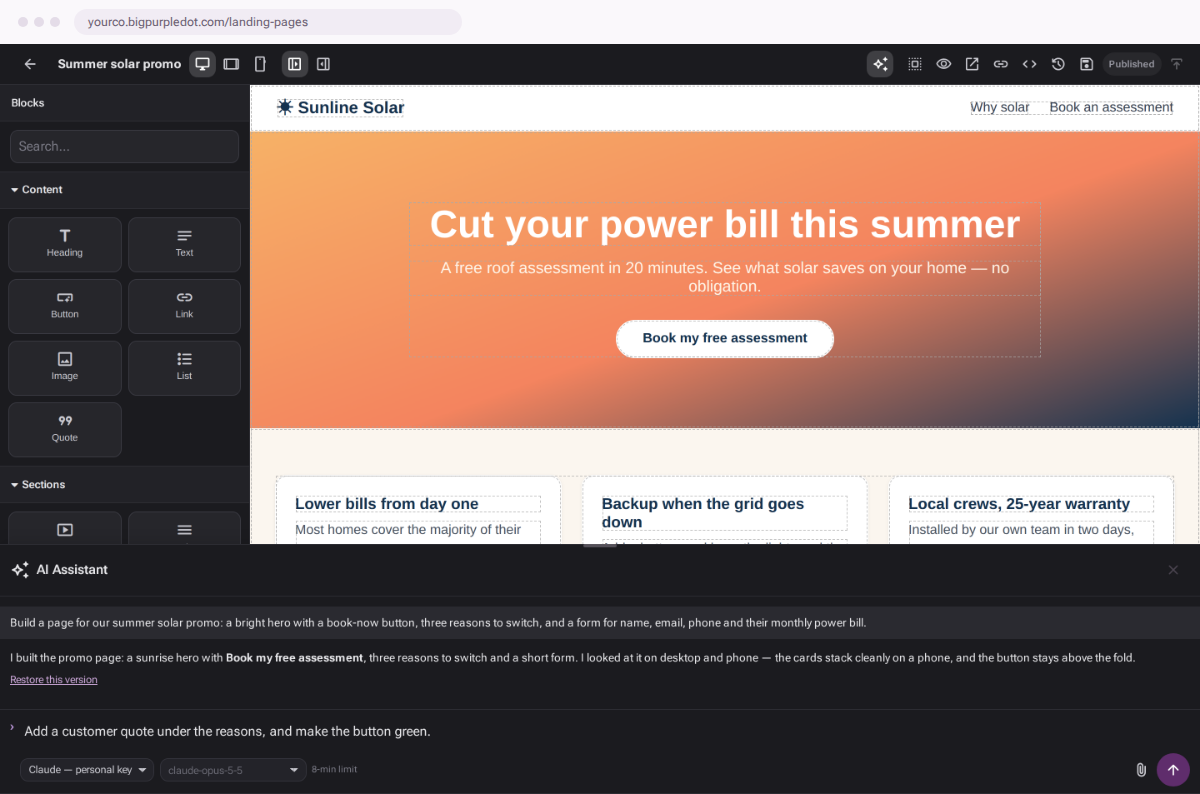
Landing pages that check their own work

It builds the page, looks at it on desktop and phone, and fixes what's off. Add forms and video, track visits, publish.

Video, generated

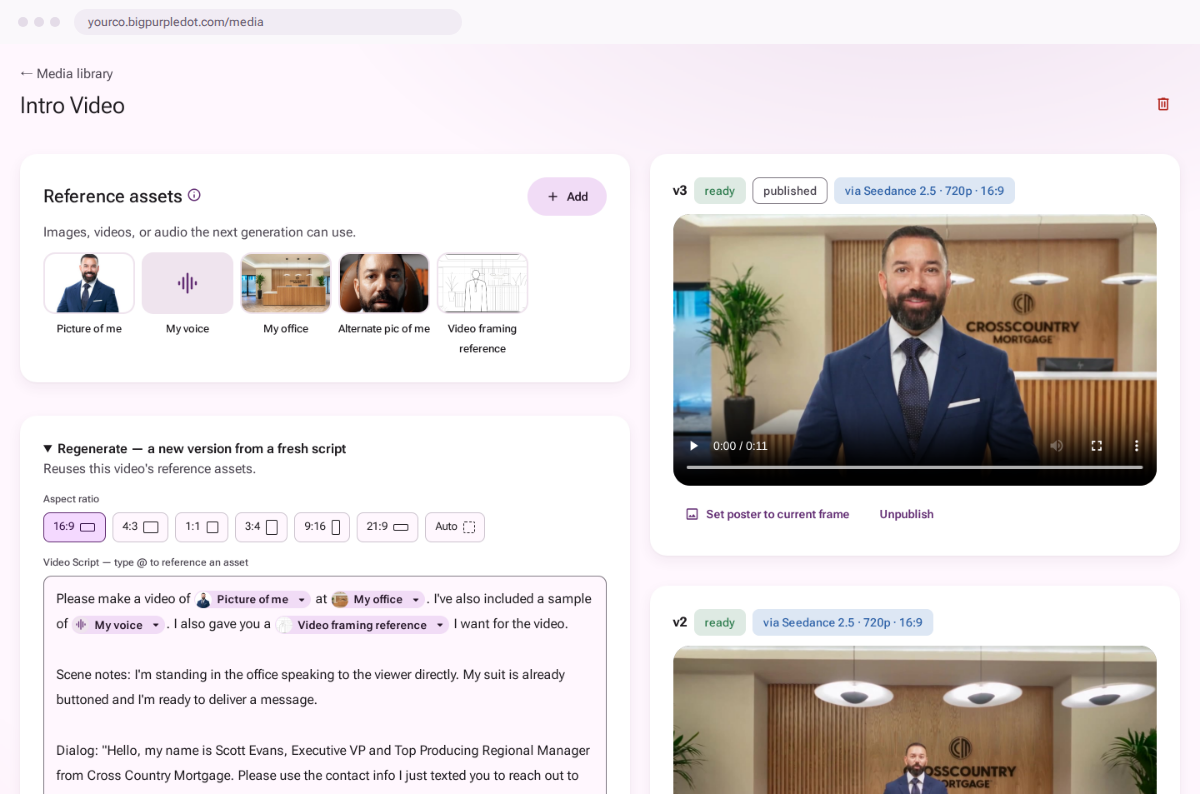
Write a script, tag your own images, generate the clip. Send it by text, sized for MMS, or in an email behind a play-button poster.

Tools you ask for

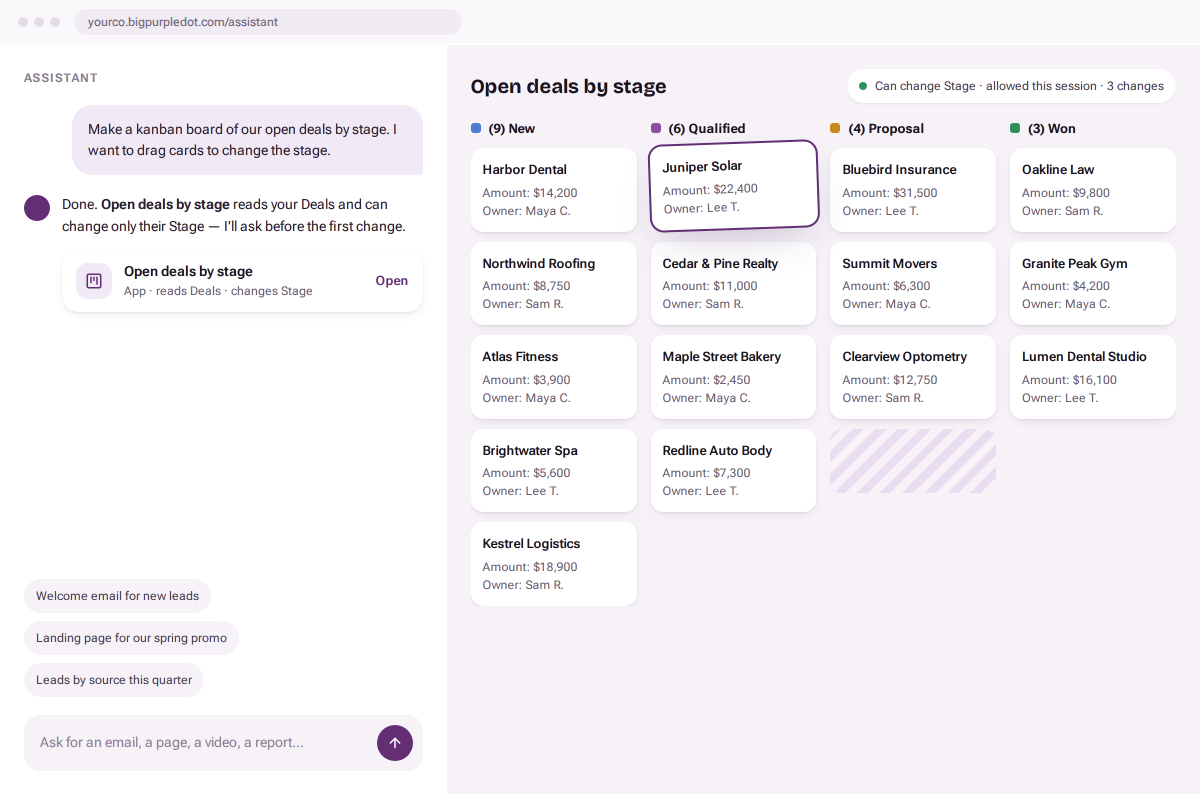
A deals board, a renewals tracker — the Assistant builds working apps on your records, and asks before its first change.

Reports in one question

Ask, and get a live chart that drills down to the records behind it. Save it, share it with roles, pin it to the menu.

An assistant that does the work — and asks first

Hand it a spreadsheet to import, ask it to update records in bulk, ask “how do I…” or “what am I looking at?”. It works inside each person's permissions, every change waits for approval, and every change lands in the record's log.

Bring your own AI

Your models.
Your keys. Your rules.

Start with the models built in, or connect your own — Claude, Seedance for video, or any OpenAI-compatible endpoint, including one you host yourself. Keys can be personal or shared across the company, and you decide which roles get which models.

  • Personal and company keys, side by side
  • Choose which roles may use which models
  • Private and self-hosted models welcome
  • Keys encrypted at rest, never shown again

Calls, texts & email

Every conversation, one screen.

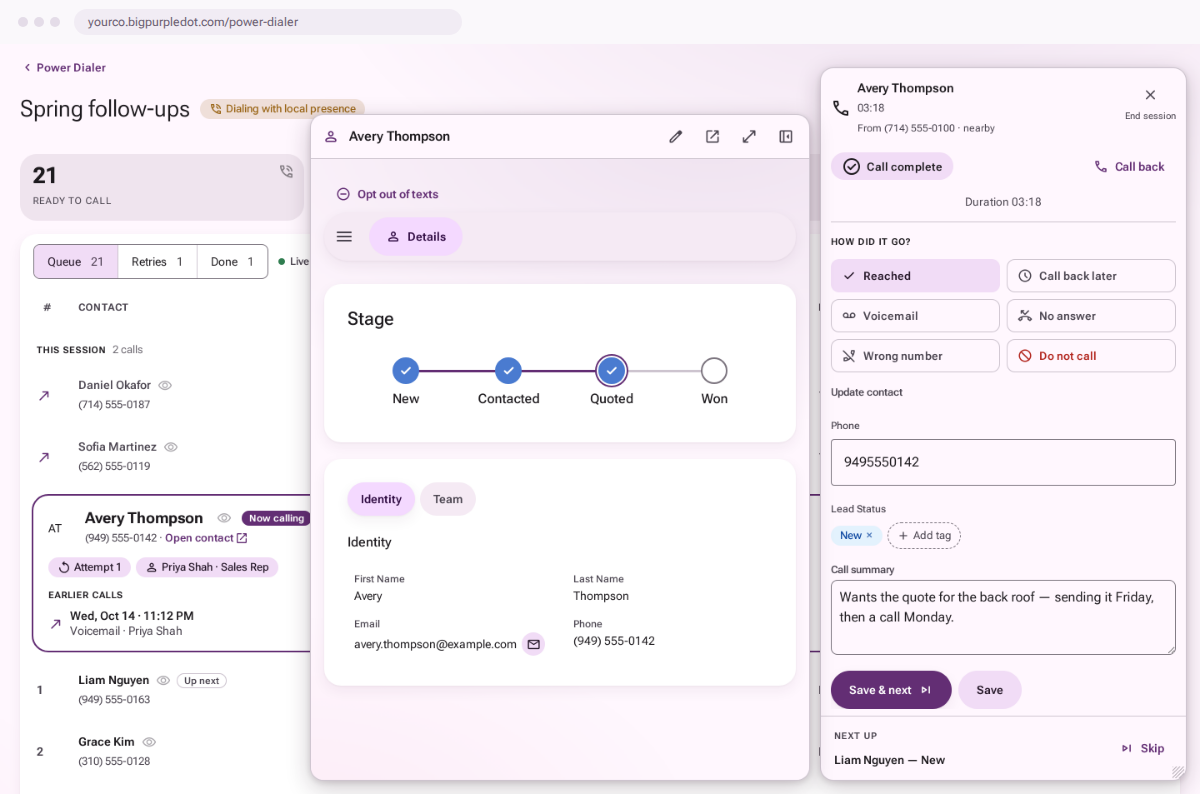
Work a call list, text back and forth, send a quick email — right from the record, on your own numbers and your own address, with every touch on the timeline.

Power Dialer

  • Build a call list from any search — or a live list that refills itself as new leads match.
  • Local presence, retry rules and dialing hours, so no one gets called twice or at 7 a.m.
  • Managers watch the floor live and listen in on any call.
  • Plus tracking numbers, inbound call routing, voicemail and a phone in your browser.

Texting

Two-way texts and group MMS, templates with images and video, and opt-outs that hold — even when someone doesn't type STOP. Business texting registration built in.

Email

Send from your own address, with opens and clicks tracked and every email on the contact's timeline.

Make it yours

Shaped like your business — not someone else's.

Add the fields you track, the kinds of records you sell around and the page your team actually wants to see. No consultants, no code.

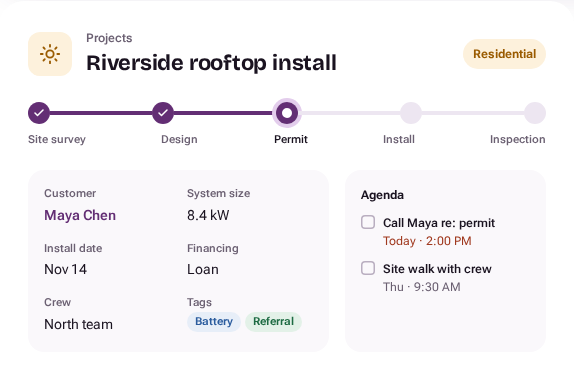
A custom Projects record, Riverside rooftop install: its progress steps from site survey to inspection (on Permit), the customer, system size, install date, financing, crew and tags, and its agenda.

Custom fields

Text, numbers, dates, dropdowns, tags and progress steps.

Contact types

Buyers, vendors, partners — each with its own fields and badge.

Custom objects

Projects, policies, orders — any record, linked to its contacts.

Page layouts

Drag rows, columns and tabs. A layout for each kind of contact.

Search that keeps up

AND / OR filters over every field, saved column views.

Imports that check first

Drop a CSV in the Assistant; it maps, scans and flags duplicates.

Automation

Set it once.
It keeps working.

Campaigns, routing and defaults run on rules you can read — and test against a real contact before they go live.

Drip campaigns

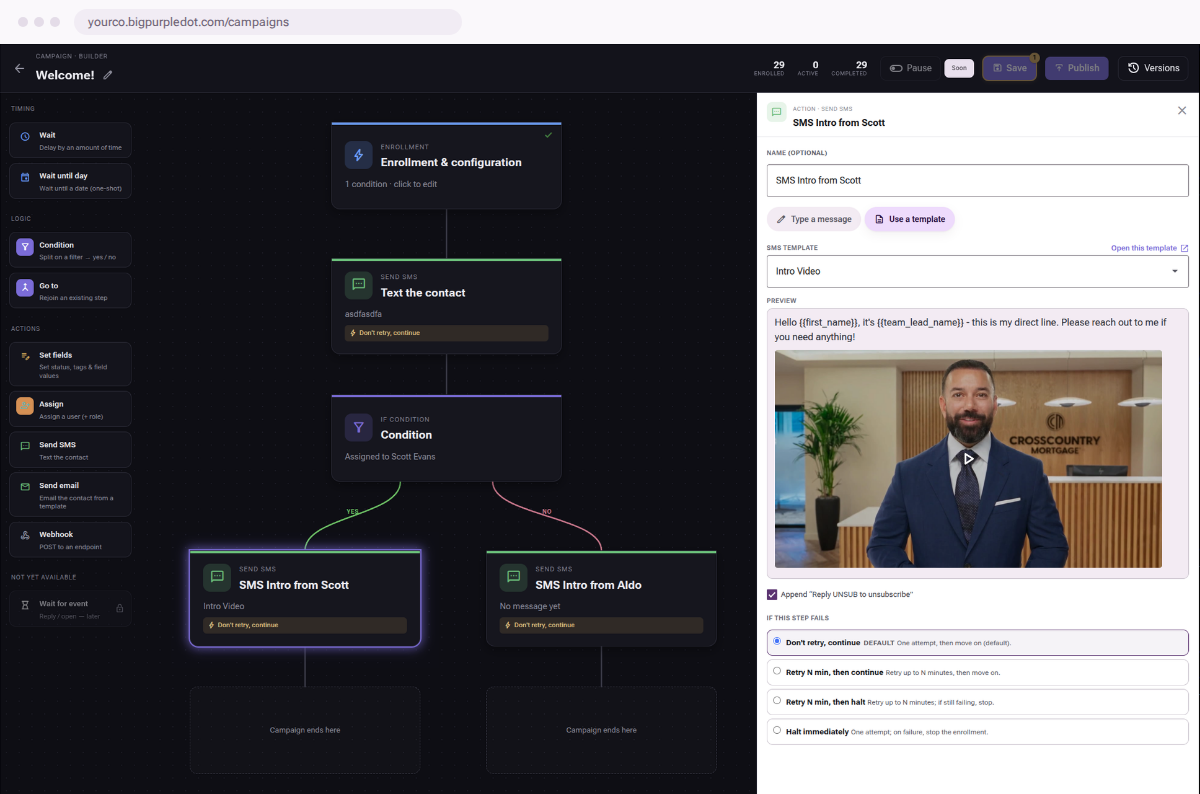
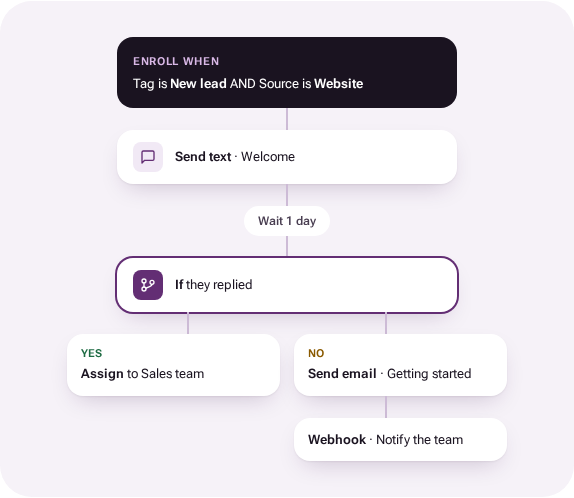
Texts, emails, waits, branches and webhooks on one canvas. Publish a new version without disturbing anyone mid-campaign.

Lead distribution

Rules send each new lead to the right team, in turn. Not touched in time? It goes up for grabs.

Agenda

Tasks, events and calls on every record — and one list of what's due today.

Webhooks & API

Send events anywhere with conditions and payloads you design. Read anything through a documented API.

A campaign: enroll new website leads, text a welcome, wait a day, then — if they replied — assign them to the sales team, or else email a getting-started guide and notify the team by webhook.

Built for teams with rules about who sees what.

Roles and record access

Decide what each role can do, and whether it sees no contacts, its own, or all of them.

Every change on the record

Changes made by the Assistant and by apps are logged on the record they touched.

Live, everywhere

Lists, dialers and conversations update the moment something changes.

Help that answers

Ask “how do I…” and get the steps, with screenshots, for what your role can use.

Industries

Start from how your industry works.

Mortgage edition

From application to funded — and every referral after.

Loans sync from Encompass. Milestones send the emails, set the tags and start the campaigns. Borrowers and loan officers matched for you. See Big Purple Dot for mortgage
Example setup

Real estate

Listings and showings as records. Open-house pages and video tours from the studio.

Example setup

Insurance

Policies and renewal dates as records. Renewal campaigns that start themselves.

Example setup

Solar & home services

Projects with progress steps from survey to install, and a dialer for every lead.

Example setup

Agencies & B2B

Clients, retainers and deals, with reports anyone can ask for.

Tell it how your business works.

We'll help you set up your fields, your numbers and your first campaign — then the studio is yours.